
A form built within the loan originating system, Encompass. It needed to be in line with new processes which were being implemented, have reportable data to be used as metrics for tracking, and be easy to digest/learn.
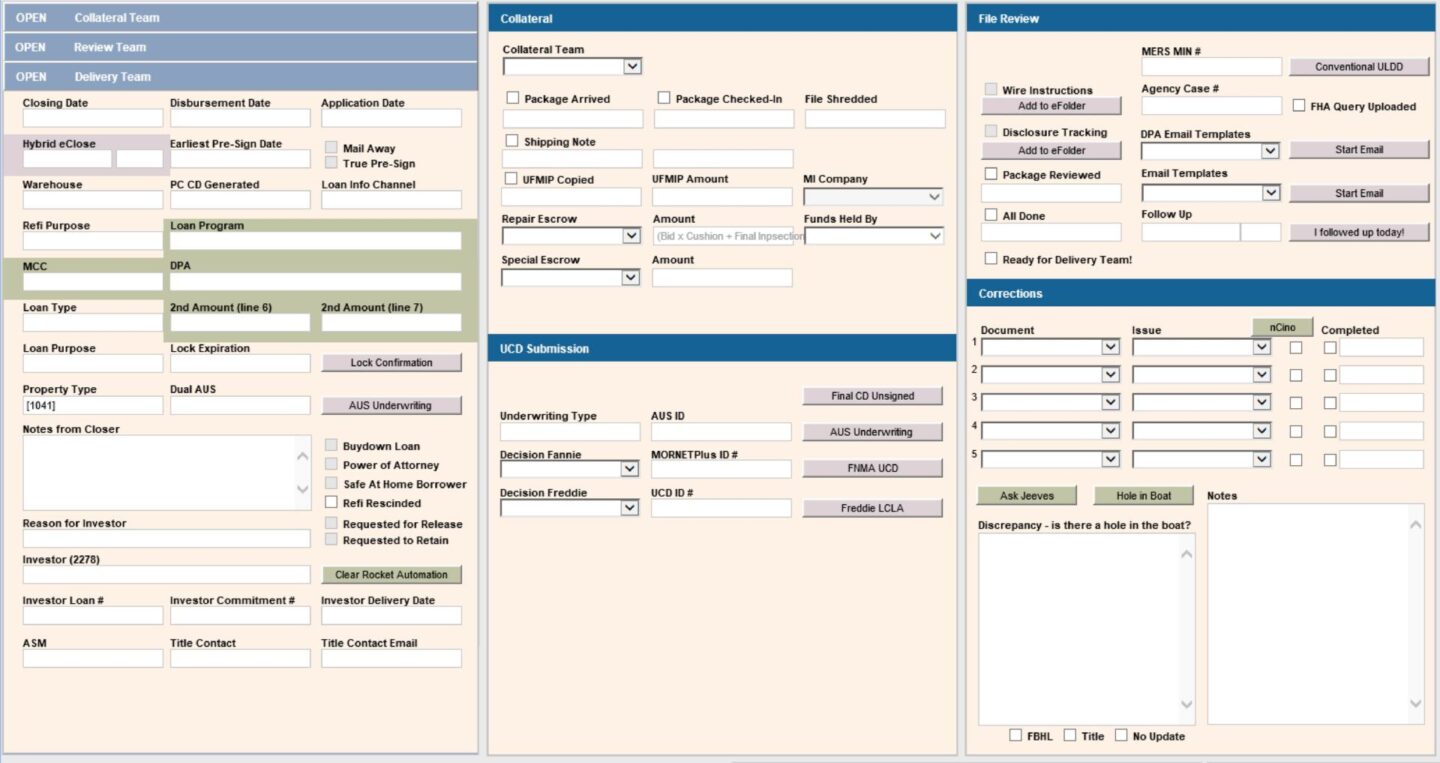
Structure –
- The main stationary panel is always visible on the left. It houses quick reference details for the loan and color indicators. At the top, there are blue buttons that open other panels.
- Three panels (collateral team, review team, and delivery team) open to the right of the main panel in the same location. In the department’s processes, a loan is opened three times; these three panels separate the information they need to look at.
Key pieces of the design –
- Color indicators on the main panel trigger when specific loan types are open. For example, a hybrid eClose has a purple indicator appear while a DPA program shows up with green. Loans that open with a color signify to the Shipper that it has a special review process.
- The fields on this form are dynamic, so they will only appear when needed. For instance, the collateral team panel includes a UCD section that is only viable on conventional loans. Removing this section from the other types of loans reduces visible clutter and increases speed since the Shippers know they won’t have to look at those sections and deduce if it is needed or not.
- The correction section on the review team panel houses the majority of reportable data for the Department. When a loan is reviewed, the Shippers will log the issues in a document + issue format and include additional details in the notes box below. Each month, the data from these fields is pulled, analyzed, and brought to operations managers as a way of showcasing common issues that made it past Closing a loan.
Programs: Encompass (final version), Microsoft PowerPoint (mockups), Microsoft Excel (field information data)